
How to Optimize Your Google Business Profile to Dominate Local Search (2025 Guide)
If you followed our last guide, you’ve already claimed and verified your Google Business Profile (GBP). That’s the hard part done! Now, you have a digital storefront – a powerful, free asset that connects you directly to customers searching nearby.
But just having a profile isn’t enough.
An unoptimized GBP is like opening a physical store with no sign, dim lights, and an empty shelf. You might technically be open for business, but nobody’s going to walk in.
Optimization is the process of turning that bare-bones profile into a 24/7 lead-generating machine — and it’s the answer to the question many owners ask: how do I optimize my business on Google? It’s how you signal to Google that you are the most relevant, reliable, and active business in your area — and one of the most effective ways to improve your local search results.
At Cut Throat Marketing, we know that in the competitive South Carolina Midlands, visibility is everything. This master checklist breaks down the exact steps we use to optimize a GBP, forming a proven local search marketing strategy that’s simple and manageable for any small business owner.
This isn’t about keywords and fluff; it’s about strategic completeness. Let’s make your profile work for you.
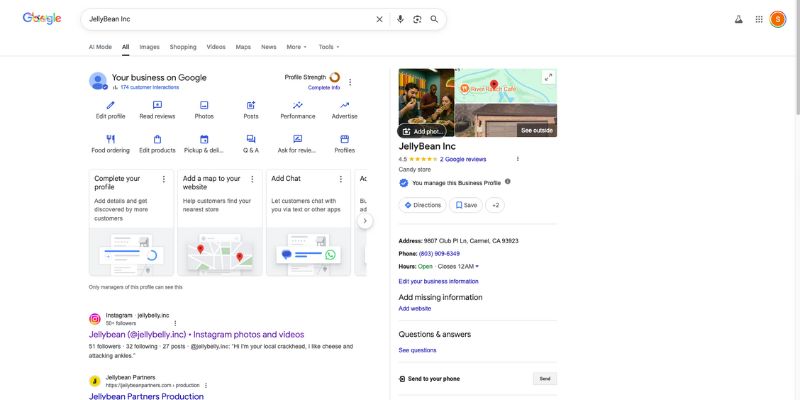
Part I: The Foundation – Getting Your Profile Data Locked In
The first step in optimization is making sure the core information – the literal DNA of your profile – is flawless. Google uses this information to decide whether you even deserve to appear in the local Map Pack.
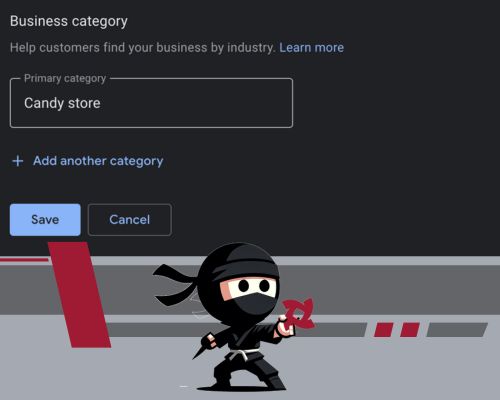
Step 1: Max Out Your Categories (The Single Biggest Ranking Factor)
Your business categories are the single most important ranking signal in your entire profile. They tell Google what you are, not just what you do.
The Cut Throat Strategy:
- Select the Perfect Primary Category: This must be the most accurate, core function of your business.
-Bad: “Contractor”
-Good: “Roofing Contractor,” “Medical Spa,” or “Commercial Plumber.” - Add 2-4 Supporting Secondary Categories: While Google allows up to ten, overloading it can confuse the algorithm. Stick to 2-3 categories that genuinely reflect the rest of your services.
–Example Plumber: Primary: Plumber. Secondary: Drainage Service, Water Heater Contractor, Emergency Plumbing Service. - No Keyword Stuffing: Do not create a custom category just to cram in a keyword. Choose from the official list Google provides. Accuracy over volume, every time.
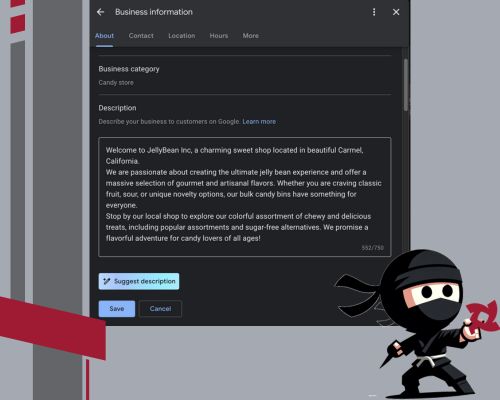
Step 2: The Business Description (Your 750-Character Elevator Pitch)
You have up to 750 characters to sell your business to both potential customers and Google’s algorithm. This is not the place for flashy marketing-speak, but for clear, keyword-rich, natural language.
What to Include:
- Your Core Services & Products: Mention your top 3-5 offerings early.
- Residential or Commercial Focus: Clearly state who you serve.
- Your Service Area: Naturally weave in the cities and neighborhoods you cover.
- Unique Value Propositions (UVPs): Mention things like 24/7 service, free estimates, transparent pricing, or guaranteed work.
Pro-Tip: Make sure your description sounds like a human wrote it for another human. Use the full 750 characters if you can, focusing on the first 250 characters as your most important piece of real estate, as that’s often what shows up in the preview.
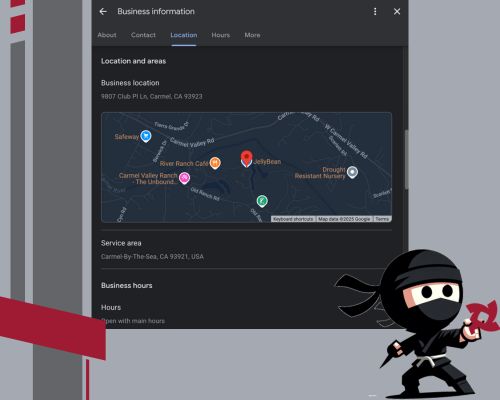
Step 3: NAP and Hours (Consistency Builds Trust)
NAP stands for Name, Address, and Phone number — a core concept in local SEO often referred to as NAP for SEO. Consistency of this information across the entire web – your website, social profiles, Yelp, etc. – is critical for local SEO.
- Business Name: Must match your legal, registered business name exactly. Never add keywords here (e.g., “The Best Plumber in Columbia!”). This violates Google’s guidelines and risks profile suspension.
- Hours: Keep them accurate and up to date. Critically, use the “Special Hours” feature for holidays, seasonal closures, or unexpected emergencies. Nothing kills a conversion faster than a customer showing up when you’re closed.
- Website Link: Point this directly to your most authoritative page – usually your homepage or a primary service page. Don’t link to a random blog post or your Instagram profile.
Part II: The Engagement Engine – How to Be Active
Optimization is not a one-time setup; it’s an ongoing commitment. Google rewards profiles that show consistent signs of life. This is your chance to prove you’re active, reputable, and reliable.
Step 4: Master the Services Section (The Service-Area Secret Weapon)
The Services section is one of the most underused features, yet it’s a powerful tool for ranking in high-intent local searches that don’t automatically trigger the map pack.
The Playbook:
- List Every Individual Service: Don’t just list “Plumbing.” List every service you provide: “Drain Cleaning,” “Water Heater Replacement,” “Toilet Repair,” etc.
- Add Keyword-Rich Descriptions (The SEO Hook): For each service, write a clear description (up to 300 characters). This is where you can naturally reinforce your local relevance.
–Example: For Drain Cleaning, the description should be: “We offer fast, professional drain cleaning in Charleston and surrounding areas, with same-day service available. Our techs remove blockages, roots, and clogs – guaranteed.” - Use Price (If Applicable): If you can offer general pricing or mark it as “Varies,” do so. Transparency builds trust.
Bonus: Mentioning local cities or zip codes in these service descriptions reinforces your geographic relevance in Google’s eyes, boosting visibility for searches originating in those areas.

Step 5: Leverage Google Posts (Your Micro-Blog in Search)
Think of Google Posts as your mini-ads, running directly in the search results. They keep your profile fresh, promote offers, and give you an extra hit of keyword relevance. Aim for at least one Post per week.
The Three Key Post Types:
- What’s New (General Updates): Ideal for service reminders, team introductions, blog highlights, or seasonal messaging.
Example: “Want your skin to look fresh this fall? Book our facial rejuvenation at our spa in Irmo, SC – this treatment reduces fine lines and revitalizes your complexion.” - Offer (Discounts & Deals): Perfect for limited-time sales. This post type provides a built-in “Redeem” button and a clear expiration date.
Example: “New Customer Special! Get $25 off your first plumbing service when you mention code FIRST25. Valid through September 30.” - Event (Time-Bound Happenings): Use this for actual events, open houses, or webinars.
Key Rule: Include a high-quality image, a clear link to the relevant page on your website, and a strong Call-to-Action (like “Book,” “Call,” or “Learn More”) on every post.

Step 6: Flood Your Profile with High-Quality Photos
Listings with photos get 2x more requests for directions and 35% more website clicks. Photos are your digital proof that you are real, professional, and active.
What to Upload (Regularly):
- Branded Assets: Your Logo (square format, high-res) and a strong Cover Photo (horizontal, high-res) that showcases your storefront or team.
- Work in Action: Before-and-after project photos, your team in uniform, and branded vehicles at job sites.
- The Power of Geo-Tagging: When possible, upload photos directly from a mobile device with location services turned ON. Google uses the GPS metadata to reinforce that you are actively working in the areas you claim to serve.
Goal: Upload 1-2 new photos every single week. This consistent flow of fresh, localized visuals is a massive activity signal to Google.

Step 7: Weaponize the Q&A Section (Pre-Empting Customer Hesitation)
This section is perhaps the most underrated feature in GBP. You can – and should – ask and answer your own questions here. You’re proactively answering the questions your customers are already typing into Google.
The Q&A Strategy:
- Ask 5-10 Common Questions: Think about what a nervous first-time customer would ask: Do you offer free estimates? What areas do you serve? Are you licensed and insured?
- Write Keyword-Rich Answers: Just like with Services, use this space to drop relevant keywords and location terms naturally.
Example Question: Do you offer same-day drain service?
Example Answer: Yes, we provide same-day emergency drain cleaning throughout Charleston and surrounding areas. We’re always ready to help with clogs or backups. - Monitor Public Questions: If a customer submits a question, answer it promptly and professionally.
Google indexes this content, meaning your FAQs can help you show up in search results even if the user never clicks the profile. This builds trust and positions you as the local expert.

Part III: Long-Term Management – Consistency Wins
You’ve built the machine – now you need to run it. Optimization is an initial sprint; management is the ongoing marathon. The profiles that stay on top are the ones that are consistently active — consistency is often the missing piece for businesses wondering how they can improve their local SEO results.
Step 8: Respond to Every Review (It’s SEO, Not Just Etiquette)
Reviews are the social proof that drives conversions, and following Google reviews best practices — especially how you respond — is a crucial ranking factor. Google looks at volume, recency, and quality of engagement.
The Cut Throat Review Protocol:
- Respond to All Reviews: Positive, negative, or vague—respond to every single one.
- Use Keywords in Your Replies: This is the most powerful SEO move you can make in the review section. Thank the customer and naturally mention the service they received and the location.
–Example Response: “Thanks so much for trusting us with your water heater replacement in Columbia! We’re so glad the install was fast and clean.” - Handle Negative Reviews Professionally: Always respond with a professional tone. Apologize for the poor experience, validate their frustration, and offer a path to resolution offline (e.g., “Please call the owner directly at [Number] so we can fix this immediately.”). Public arguments look terrible.
- Flag Fake or Spammy Content: If you receive a review that is clearly fake, spam, or irrelevant, use the “Flag as inappropriate” function to have Google review it for removal.

Step 9: Monitor Performance (What Gets Measured Gets Managed)
Google gives you free, powerful analytics via the “Performance” tab. Logging in monthly to track these key metrics will tell you exactly what’s working and what needs tweaking.
| Metric | What It Means | Why It Matters |
| Discovery Searches | The customer searched for a service or category you offer (e.g., “med spa near me”). | This is the most valuable traffic. It means optimization is working! |
| Direct Searches | The customer searched for your exact business name. | Great for branding, but less valuable for growth than Discovery. |
| Interactions (Calls, Clicks, Directions) | What customers did once they saw your profile. | This is your conversion rate. High Views + Low Interactions means your Photos or Description need work. |
| Photo Views | How often your images are viewed compared to similar businesses. | High activity here means your visuals are drawing attention. Upload more of what’s working! |
By checking this monthly, you can make strategic adjustments. If your “Water Heater Replacement” post gets 50 clicks, post more about water heaters next month.
Step 9: Monitor Performance (What Gets Measured Gets Managed)
Google gives you free, powerful analytics via the “Performance” tab. Logging in monthly to track these key metrics will tell you exactly what’s working and what needs tweaking.
| Metric | What It Means | Why It Matters |
| Discovery Searches | The customer searched for a service or category you offer (e.g., “med spa near me”). | This is the most valuable traffic. It means optimization is working! |
| Direct Searches | The customer searched for your exact business name. | Great for branding, but less valuable for growth than Discovery. |
| Interactions (Calls, Clicks, Directions) | What customers did once they saw your profile. | This is your conversion rate. High Views + Low Interactions means your Photos or Description need work. |
| Photo Views | How often your images are viewed compared to similar businesses. | High activity here means your visuals are drawing attention. Upload more of what’s working! |
By checking this monthly, you can make strategic adjustments. If your “Water Heater Replacement” post gets 50 clicks, post more about water heaters next month.

Step 10: Defend Your Profile (Monitoring Suggested Edits)
Your profile is constantly under threat from inaccurate information suggested by Google’s Local Guides, search data, or even competitors.
Action Step: Log in weekly to review suggested changes and approve or reject them. Google can auto-publish changes if you’re not monitoring. An unmonitored listing can quickly have its hours changed, phone number swapped, or even be marked as permanently closed. Protect your turf.
The Cut Throat Optimization Checklist – Your Weekly & Monthly To-Do List
For the busy business owner, maintaining a fully optimized GBP doesn’t have to take hours. It requires consistent, five-minute actions.
| Frequency | Action Item |
| Weekly Goal (5-10 Minutes) | Log in and complete the following: |
| Respond to all new reviews. Use location and service keywords naturally. | |
| Publish a new Google Post. Rotate between a service highlight, promotion, or FAQ/Blog update. | |
| Upload 1-2 new, fresh photos. Use a geo-tagged phone photo when possible. | |
| Review suggested edits and reject any that are inaccurate. | |
| Monthly Goal (30 Minutes) | Log in and complete the following: |
| Review Performance Stats (Last 30 Days). Focus on increasing Discovery Searches. | |
| Check and update Special Hours for upcoming holidays or seasonal changes. | |
| Audit your Service Descriptions and add any new offerings. | |
| Add a new Question and Answer to the Q&A section. |
Ready to Dominate Your Local Market?
Your Google Business Profile is the highest-ROI marketing asset you own — and one of the fastest answers to how to get my business higher on Google search without paying for ads. It’s free, powerful, and puts you directly in front of customers who are ready to buy. But it only works if you work it.
If the thought of setting up this continuous optimization schedule feels like another item on an already overflowing to-do list, that’s where we come in.
At Cut Throat Marketing, we take ownership of your entire GBP strategy – from initial setup and category audits to weekly posts, photo uploads, and review management. We handle the hustle and the hassle so you can focus on running the business you love.
Stop leaving money and visibility on the table. Are you ready for a digital marketing partner who delivers precise results?