
Master Your Local Market: The Complete Guide to Setting Up Your Google Business Profile
For home service businesses in Columbia and across South Carolina, showing up when customers search “near me” isn’t optional; it’s survival. Nearly half of all Google searches have local intent, and if your business doesn’t appear in those results, you’re invisible to half your potential customers.
The key to local search dominance? A complete, verified Google Business Profile (GBP). In this guide, we’ll walk you through exactly how to set up, verify, and complete your GBP so you can capture more leads, fill your crews’ schedules, and dominate your service area.

Why Your Google Business Profile Is Your Most Valuable Digital Asset
Your GBP isn’t just another online listing; it’s the frontline of your marketing. When 88% of local searches homeowners search for a plumber in Irmo or an HVAC company in Lexington, your profile is what they see first, and first impressions matter.
88% of local searches lead to a call or visit within 24 hours. That means almost everyone searching is ready to buy today.
Businesses with complete profiles are 2.7× more likely to be considered reputable. If your profile is incomplete, prospects bounce to a competitor before you ever get the chance to win them over.
Actively managed GBPs generate, on average, 35% more website clicks and 42% more requests for directions.
For home service companies, those aren’t vanity metrics; they’re booked jobs. At Cut Throat Marketing, we don’t chase likes or clicks; we measure success by how many times your phone rings and how many jobs get scheduled. We’ve seen optimized GBPs deliver 5-10 qualified leads per week for Columbia-area contractors, without a dime of extra ad spend.
And here’s the kicker: 56% of local retailers haven’t even claimed their Google listing. Just setting yours up properly puts you ahead of more than half your competition instantly.
Before You Start: Gather Your Business Information
Setting up your GBP correctly the first time saves headaches later. Google is strict about consistency, and errors can delay verification for weeks. Make sure you’ve got these details ready:
- Business Name: Use your exact legal business name. Don’t add extra keywords like “Best Plumber in Columbia.”
- Business Address: Physical address or service area boundaries.
- Phone Number: A local line that connects directly to your business.
- Website URL: If you don’t have a site, we can build you one designed to convert clicks into booked calls.
- Business Category: The single most important visibility factor. Research it carefully.
- Business Hours: Include regular and holiday hours.
- Business Description: Up to 750 characters, written in plain English that makes you sound like the trusted neighbor you are.
- Photos: At least a logo, cover photo, and several images of your team, work, and vehicles.
Pro Tip: Keep your NAP (Name, Address, Phone) identical everywhere online. Even small inconsistencies confuse Google and tank your rankings.
Step-by-Step Guide to Creating Your Google Business Profile
Your GBP isn’t just another online listing; it’s the frontline of your marketing. When 88% of local searcheshomeowners search for a plumber in Irmo or an HVAC company in Lexington, your profile is what they see first, and first impressions matter.
Step 1: Navigate to Google Business Profile
Head to business.google.com and click the “Sign in” button in the top right corner. You’ll need a Google account – use one that you’ll maintain long-term, as changing ownership later can be complicated.
Step 2: Enter Your Business Name
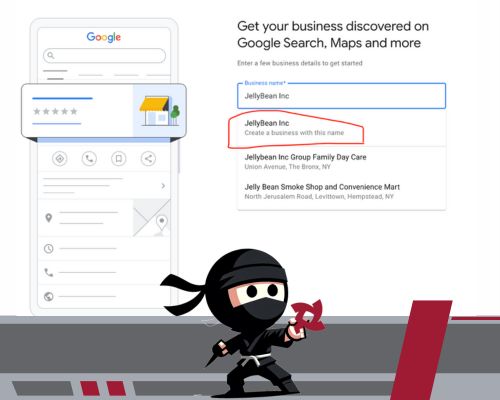
Type your business name exactly as it appears on your signage and legal documents. Google will search for existing listings. If your business appears in the suggestions, you may need to claim an existing profile. If not, click “Create a business with this name.”
Critical Note: If you find an existing, unclaimed listing for your business, claim it immediately. Unclaimed profiles can be edited by anyone, including competitors who might add incorrect information.

Step 3: Select Your Business Category
Choose your primary business category carefully – this is one of the most important ranking factors. Google provides a predetermined list, so you can’t create custom categories. For example:
- HVAC contractors should choose “HVAC Contractor”, not “Air Conditioning.”
- Plumbers should select “Plumber”, not “Plumbing Service”
- Landscapers might choose “Landscaping Company” or “Lawn Care Service” depending on their primary offering
You can add additional categories later, but your primary category carries the most weight in search rankings.
Step 4: Select the Right Business Type
During setup, Google will ask an important question: “Do you deliver products or provide services at your customer’s location?”
- If you answer yes, your profile will be created as a Service Area Business (SAB). This is for businesses that travel to customers rather than serving them at a storefront. Examples include contractors, cleaners, landscapers, or mobile service providers.
- If you answer no, you’ll be listed as a Physical Location. This option is intended for businesses with a permanent storefront and signage, allowing customers to visit you directly.
It’s important to note that fully online businesses are not eligible for a Google Business Profile. If your company operates only through e-commerce without in-person interactions, you will not be able to set up a profile. For more information, you can check out our video on eligibility requirements.
Whichever option you choose, be sure it reflects how your business actually operates. Selecting the wrong type can lead to delays and verification issues later.

Step 5: Define Your Service Areas
At this stage, you’ll let Google know the geographic areas where your business is available to work. You can list:
- ZIP codes
- Cities
- Counties
- States
Think strategically when setting these boundaries. Be realistic about how far you’re actually willing to travel, but don’t be afraid to cast a wide enough net to capture valuable opportunities. For example, if you’re comfortable driving up to 30 miles for a job, include all of the towns and neighborhoods within that range.
Remember, listing a service area doesn’t lock you into accepting every job request from that location. Instead, it helps Google show your business in searches across your full service territory. For Columbia-based companies, this could mean including Lexington, Irmo, Forest Acres, and nearby communities.
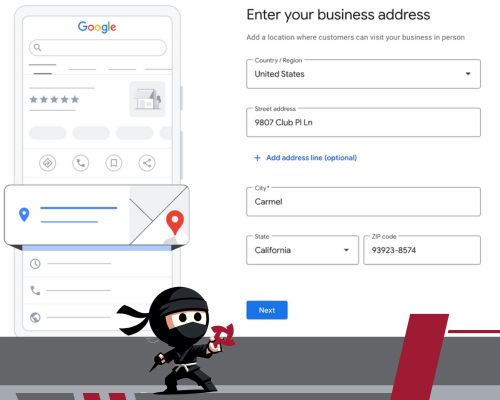
Step 6: Add Contact Information
Enter your business phone number and website URL. Your phone number should be:
- A local number (803 area code for Columbia businesses)
- Answered during business hours
- Direct to your business (not a shared line)
- Consistent across all online platforms
If you don’t have a website yet, you’re leaving money on the table. Businesses with websites alongside their GBP receive 50% more calls and directions requests.

Step 7: Verification – Proving Your Business is Real
Verification is a crucial step before your profile can go live. Without it, your business won’t appear in Google Search or Maps, and you won’t be able to update your information, post updates, or engage with customers through reviews and messages. In short, until your business is verified, your profile is essentially invisible online.
The most common method today is video verification. In most cases, Google will ask you to record and submit a short video that shows:
- Your business location
- Business assets such as vehicles, equipment, or signage
- Your operations in action
Once submitted through your Google Business Profile dashboard, most video verifications are reviewed and approved within 3-5 business days.
Other possible verification methods include:
- Phone verification: For some established businesses, Google may call you with a code. This is quick, but not always available.
- Email verification: Similar to phone, but the code arrives through your business email domain. Again, it’s only offered in limited cases.
- Postcard verification: The traditional method, where Google mails a postcard with a code to your business address. This can take 5-14 days and is typically the fallback option if faster alternatives aren’t available.
Pro tip: Avoid making changes to your business name, address, or category while you’re in the middle of verification. Updating details during this stage can reset the process and delay your approval by weeks
Saving trouble with verification? We’ve written a detailed guide to help you troubleshoot common issues and find workarounds. [Insert blog title + link here once published]


Step 8: Complete Your Profile While Waiting for Verification
Don’t wait for your verification code. You can still add crucial information:
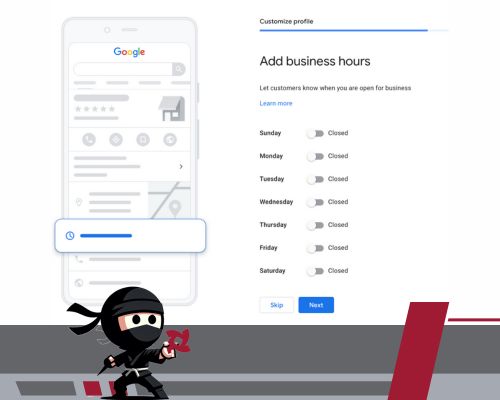
Business Hours: Set your regular hours and remember to update them for holidays. Incorrect hours frustrate customers and hurt your reputation. Google tracks when users arrive at closed businesses and may reduce your visibility if this happens frequently.
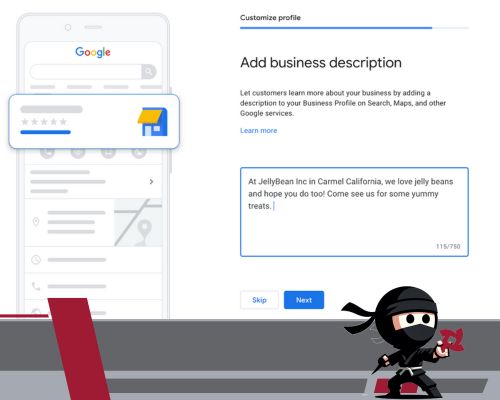
Business Description: You have 750 characters to sell your business. Focus on:
- What you do
- What areas you serve
- What makes you different
- Your experience and credentials
Example: Cut Throat Marketing helps Midlands businesses in South Carolina grow with comprehensive digital marketing services, including SEO, PPC ads, content strategy, and branding. Backed by an award-winning team of specialists, we blend smart design, marketing psychology, and data-driven tactics to turn websites into lead-generating powerhouses. Clients benefit from measurable improvements in traffic, conversions, and revenue, supported by honest guidance and a collaborative team that delivers results. Ready for real growth in the Midlands?
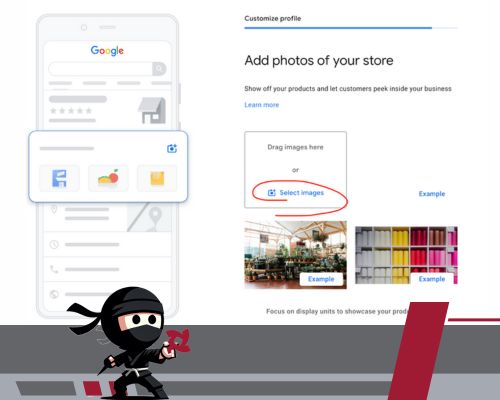
Photos: Businesses with photos receive 42% more requests for directions and 35% more click-throughs to their websites. Upload:
- Logo (square format, high resolution)
- Cover photo (represents your business personality)
- Interior/exterior photos (if applicable)
- Team photos (builds trust)
- Photos of your work (before/after shots are gold)
- Equipment or vehicle photos (shows professionalism)
Wrapping Up: Your Google Business Profile Is Ready to Work for You
By completing these steps, you’ve built the foundation for one of the most powerful marketing tools available to local businesses. Your GBP is live, visible, and ready to connect you with homeowners actively searching for your services.
But setup is just the start. A complete profile ensures you appear in searches, but an optimized, well-maintained profile is what convinces customers to choose you instead of the guy down the road. Updating photos, posting specials, and responding to reviews are the difference between blending in and becoming the obvious local choice.
We’ll cover advanced strategies in our following blogs:
- How to Optimize and Maintain Your Google Business Profile (to get more leads and stand out from competitors)
- Troubleshooting Google Business Profile Verification (so you can resolve common issues quickly)
At Cut Throat Marketing, we take that foundation further. If you’d like a deeper look at how professional profile management can drive consistent leads, take a look at our Google Business Profile services; we break down the strategies we use every day to help Midlands businesses grow.
For now, take a moment to celebrate – your business is officially visible where it matters most: on Google.