
The Review Graveyard:
How to Remove a Google Review That Violates Policy
The Ultimate Guide for Small Businesses to Flag and Appeal Inappropriate Feedback
Welcome back to the Cut Throat Marketing blog, where we cut through the noise to give you the actionable, no-fluff strategies your Columbia, SC-based business, or any small business across the country, needs to dominate the local market.
If you’ve been following our “Master Your Local Market” series (and if you haven’t, start with our Complete Guide to Setting Up Your Google Business Profile), you know your Google Business Profile (GBP) is the lifeblood of your local presence. It’s your 24/7 digital storefront, and nothing impacts that storefront’s curb appeal more than your star rating and customer reviews.
But let’s be real. Every business owner, no matter how great, eventually runs into a problem review. Sometimes it’s a disgruntled person who was never a customer. Sometimes it’s spam from a competitor. And sometimes, it’s just plain nasty.
The good news? You can fight back. The key is to understand Google’s rules and follow the proper protocol.
This isn’t about deleting reviews just because they’re negative. Google firmly believes in providing unbiased customer feedback, which means a truly negative but honest review is likely to stay. This guide is dedicated to tackling the reviews that truly violate Google’s policies; the fake, misleading, or abusive ones and getting them into the review graveyard where they belong.
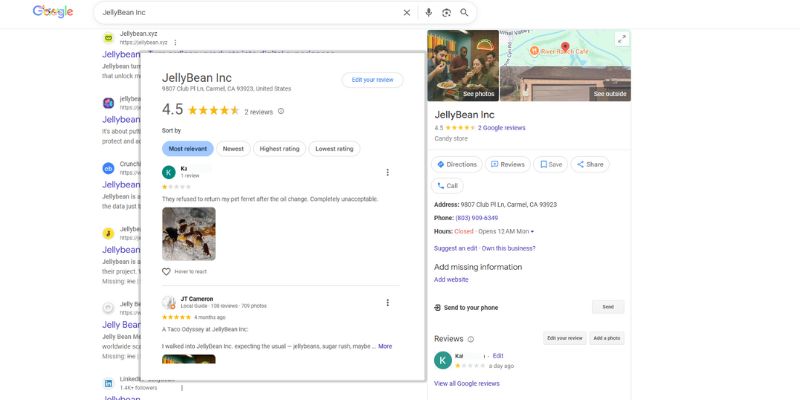
The Hard Truth: Understanding Google’s “Removal Rules”
Before we dive into the steps, we need to manage expectations. Google won’t remove a review simply because it gives you one star or feels “unfair.” They are interested in removing content that is untrustworthy, illegal, or irrelevant.
If a review reflects someone’s subjective opinion or genuine (even if frustrating) experience, Google considers it a valid review and is highly unlikely to take it down. Your fight needs to be based on policy, not opinion.
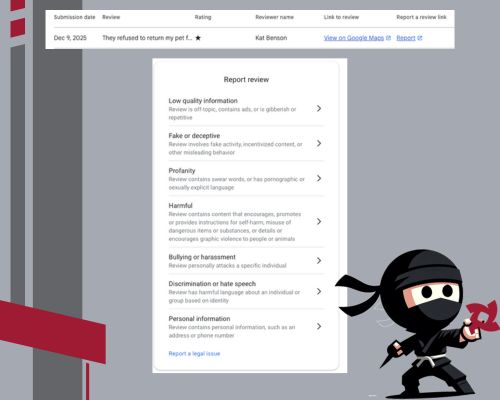
The Seven Deadly Sins: Policy Violations Google Will Remove
Your case for removal must align with one of Google’s specific Prohibited and Restricted Content policies. Here are the most common violations you can successfully fight:
- Spam and Fake Content: This is the most common violation. It includes reviews written by bots, fake accounts, or content posted by the same user multiple times from different accounts. It also covers reviews from someone who clearly hasn’t had an experience with your business (e.g., they mention a service you don’t offer).
- Off-Topic: The review is clearly irrelevant to an actual experience at or with your business. Examples include political commentary, personal rants, or reviews of the wrong business location.
- Conflict of Interest: This is feedback from someone affiliated with the business (like an employee, former employee, or family member) or, crucially, a competitor’s business.
- Profanity: Content containing swear words, sexually explicit language, or detailed graphic violence/illegal activity.
- Bullying or Harassment: The review personally attacks a specific individual (like an employee by name) or includes threats.
- Hate Speech: Content that promotes discrimination or hatred against an individual or group based on identity (e.g., race, religion, gender).
- Personal Information: The review contains private, personally identifiable information, such as an address, phone number, or confidential financial details.
If your review fits one of these categories, you’ve got a strong case. Now, let’s get into the action plan.
Step 1: Respond to the Review (The Crisis Communication Step)
This step is non-negotiable and must be done before you report the review. Why? Because while you wait for Google to act (which can take days or weeks), hundreds of potential customers will read that review and, more importantly, read your response.
Your public response is your chance to manage the narrative and demonstrate your professionalism and customer service to future customers.
The Golden Rules of Responding:
- Be Professional, Not Defensive: Take a deep breath. Never respond emotionally. Your response is for the benefit of future customers, not the reviewer.
- Acknowledge and Apologize (Carefully): Start by acknowledging the comment and apologizing for the negative experience, without admitting fault if the facts are disputed.
- Example: “We sincerely apologize that your experience did not meet expectations.”
- Take it Offline: This is critical. Immediately pivot the conversation to a private channel. Do not try to resolve the issue in the comments.
- Example: “We take this feedback seriously and would like to understand more about what happened. Please contact us directly at [your dedicated customer service email or phone number] so we can resolve this.”
- Call Out the Policy Violation (For fake/spam reviews): If the review is clearly fake, you can politely and factually state it.
- Example (for suspected spam/competitor): “We take customer feedback seriously, but after checking our records, we can find no record of a customer with this name, nor any service appointment matching this description. If you are a genuine customer, please contact us directly so we can verify your experience and make things right.”
Responding first shows Google you are an engaged, responsible business owner who is attempting to resolve the situation, not just censor criticism.
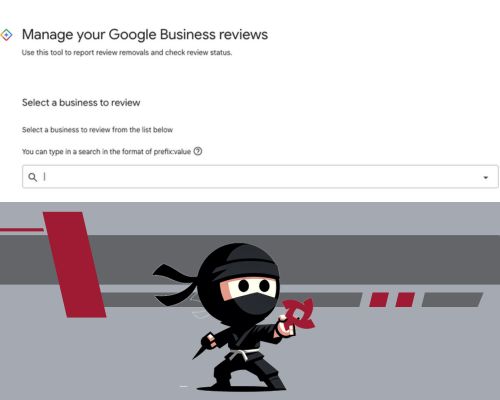
Step 2: The Two Ways to Report/Flag the Review
There are two primary ways to report a policy-violating review. The first is faster, and the second uses Google’s dedicated management tool for tracking status. We recommend using the dedicated tool for better oversight.
Option A: The Quick Report (Directly on Your Profile)
This is the fastest way to flag a review for initial review by Google’s automated systems:
- Access Your Profile: Search for your business name directly on Google Search or Google Maps while logged into your business email. Your GBP management panel should appear.
- Navigate to Reviews: Click the “Read reviews” icon on your dashboard.
- Flag the Review: Find the specific review you want to report.
- Click the Flag Icon (or Three Dots): You will see the explanation symbol or three vertical dots (⋮) next to the review. Click this.
- Select “Report Review” or “Flag as inappropriate.”
- Choose Your Reason: A menu will appear with the list of policy violations (Spam, Off-Topic, Conflict of Interest, etc.). Select the reason that best describes why the review should be removed.
- Send Report: Click “Send report” or “Submit.”
Option B: Using the Reviews Management Tool (Recommended for Tracking)
This method takes you through Google’s dedicated Reviews Management Tool, which gives you a clear dashboard to track the status of your reported reviews and initiate the appeal process later.
- Go to the Tool: Navigate to the dedicated reporting workflow link provided by Cut Throat Marketing: Google’s Review Removal Workflow.
- Sign In: Sign in with the business email associated with your GBP.
- Select Your Business: Choose the specific business location you are managing.
- Initiate Report: Click Continue → Report a new review for removal → Continue.
- Find and Report: The tool will show you a list of your latest reviews. Find the problematic review and click “Report” next to it.
- Select Reason and Submit: A new window will appear where you select the violation reason (Spam, Profanity, Conflict of Interest, etc.) and click “Submit.”
What Happens Next?
Google will automatically review your report, often using AI/automation first.
- Timeline: While Google historically claimed “most reports are processed within 3 business days,” it can often take several days to a week or more.
- Status Check: You can revisit the Reviews Management Tool (Option B) to check the status. The status will typically show:
- Decision Pending: Google is still reviewing the content.
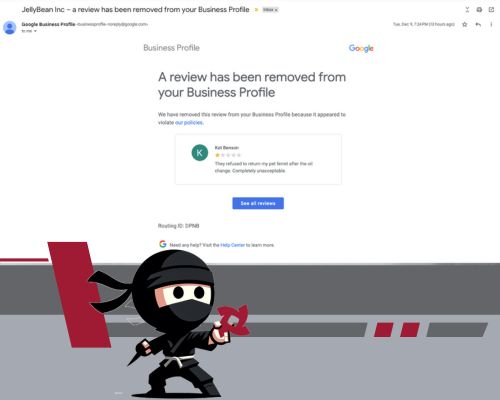
- Review Removed: Success! The review is gone.
- Report reviewed – no policy violation: Google has denied your request. This is where the real work begins.
Step 3: The Second Chance – Submitting a One-Time Appeal
If Google denies your initial report, don’t throw in the towel. This happens frequently, especially when a review is subtle or was only screened by an automated process. You have the right to a one-time appeal for an additional human review.
This is your most important opportunity to make a detailed, factual case.
How to Initiate the Appeal:
- Revisit the Tool: Go back to the Google Reviews Management Tool and sign in.
- Check Status and Appeal: Select your business and click Continue → Check the status of a review I reported previously and appeal options → Continue.
- Find Eligible Reviews: At the bottom of the status page, you will see the option to “Appeal eligible reviews.” Click this.
- Select the Review(s): Select the review(s) that were denied and proceed to Submit an appeal.
- Fill Out the Appeal Form: A new tab will open with a form asking for detailed justification. This is your moment.
Writing a Winning Appeal:
Do not get emotional. Do not write a long, narrative paragraph about how unfair the reviewer is. You must be specific, factual, and strictly focused on Google’s policies.
| Instead of Saying (Opinion) | Say This (Policy & Fact) |
| “This person is a liar and never bought anything from us. This is hurting my business.” | “This review violates the Spam and Fake Content policy. We reviewed our records (invoicing, appointment log, email correspondence) and can find no record of a client named ‘John Smith’ or an appointment on the date mentioned. This is a clear case of non-customer fraudulent activity.” |
| “This guy is an employee of my biggest competitor trying to make me look bad.” | “This review violates the Conflict of Interest policy. The reviewer, ‘Jane Doe,’ is currently listed as a [Job Title] at [Competitor Business Name]. We have attached a screenshot of her LinkedIn profile showing her affiliation with our competitor as evidence.” |
| “The review has hate speech, and it’s gross.” | “This review violates the Hate Speech policy by using derogatory and harmful language against an individual/group based on [state the identity, e.g., race]. The specific quote is: ‘[Quote the line].’ This language is prohibited.” |
Crucial: Gather and Submit Evidence. At the end of the appeal process, you will be prompted to attach optional evidence. If the review is from a competitor, you must attach screenshots proving their employment or affiliation. If it’s spam, attach a screenshot of your internal client records showing no match. You must submit this evidence within 60 minutes of submitting the appeal.
Step 4: Final Options (If the Appeal Fails)
If you follow the process – Report, Wait, Appeal, Wait – and the review is still denied, you have two final pathways to pursue, only for the most egregious violations.
Option A: The Google Business Profile Community Forum
Believe it or not, the community forum is often where the final action happens.
- Access the Forum: Post your case in the official Google Business Profile Community Forum.
- Provide Context and Case ID: Detail the situation and why you believe the review violates the policy. Most importantly, include the case ID number you received from your previous appeal.
- The Moderator Effect: The forum is moderated by Product Experts (volunteers, not Google employees) who are highly knowledgeable about the policies. If an expert agrees that the review is a clear violation, they can often escalate the issue directly to Google staff for a final, higher-level review. This bypass can sometimes lead to the removal of stubborn reviews.
Option B: Legal Removal
If the review contains provably false and defamatory statements that are causing quantifiable damage to your business, you can pursue legal action.
- Obtain a Court Order: This involves consulting an attorney specializing in internet law and obtaining a court order that legally declares the review defamatory and demands its removal.
- Submit to Google’s Legal Team: Once you have a valid court order, Google has a dedicated legal removal process and typically complies with legitimate court-ordered demands for content removal.
This is the most time-consuming and costly option, but it’s the only way to possibly remove a review that is factually false and harmful but doesn’t technically violate Google’s content policies (for example, a customer lying about the quality of service).
The Best Defense is a Great Offense: Drowning Out the Negativity
While the removal process is necessary for policy violations, the most effective long-term strategy for managing your local reputation remains simple: generate more positive reviews.
A single negative review has almost no impact when a sea of recent, glowing 5-star reviews surrounds it. Consistent positive feedback acts like a tide, naturally drowning out the occasional negative one and assuring future customers that your business is trustworthy.
- Ask for Reviews (The Right Way): Make it a consistent part of your closing process. Train your staff to ask happy customers to leave feedback.
- Make it Easy: Provide simple, direct links via email or text.
- Embrace Software: For larger operations, automation is key. Our reputation management software, The Ninja Inbox, helps you effortlessly manage the entire process, sending review requests via text/email and making it ridiculously easy for your happy customers to leave you 5-star feedback.
Don’t let policy-violating reviews hold your business back. Know your rights, follow the process, and stay professional.
Ready to Turn Feedback into Five Stars?
Dealing with spam, competitors, and the confusing Google appeal process shouldn’t be a full-time job. Your time is best spent running your business rather than managing the review graveyard.
If you’re tired of the headache and ready to put a system in place that consistently generates positive reviews to protect your profile, it’s time to call in the experts.
Let Cut Throat Marketing take over your local SEO battle plan. We specialize in Google Business Profile management, reputation strategy, and implementing systems that drive consistent, high-quality leads right to your door.
Stop fighting the reviews and start dominating the search results. Schedule a free, no-obligation consultation with Cut Throat Marketing today to discuss how our Reputation Management services can safeguard your five-star presence.
Schedule Your Free Consultation Now
Cut Throat Marketing is a digital marketing company based in Columbia, South Carolina, specializing in Local SEO and Google Business Profile management for high-growth small businesses.